The website chat has a JavaScript interface for developers. Your site's code can open the chat from its own button, change how the widget looks on some pages, fill in the lead form or the contact card with what your site knows about the visitor, sign in a visitor your site already knows, and react to what the visitor does in the chat, for example send a conversion to your analytics.
Settings from your code apply only on the pages that carry the code, in the visitor's browser. They take priority over the channel's settings in AXL but never change them: a page without the code shows the chat as set up in the channel. How to create and set up the chat itself: "Website Chat".
Quick Start: Your Own Button
To hide the round chat button and open the chat from a button on your site, put the settings before the embed code and call AXLChat('open') on click:
<script>
  window.AXLChatSettings = {
    launcher: false,
  };
  window.AXLChat = window.AXLChat || function () { (AXLChat.q = AXLChat.q || []).push(arguments); };
</script>
<script src="https://static.axl.tech/site-chat/site-chat.js" data-channel="YOUR_CHANNEL_ID" async></script>

<button type="button" onclick="AXLChat('open')">Chat with Us</button>
The line that starts with window.AXLChat = is a stub: a click that comes before the chat script has loaded is kept and runs as soon as the chat is ready. Without the round button, the open chat sits in the same corner at the bottom edge, and trigger hints appear there too. The visitor closes the chat with the cross in its header.
Take the embed code with your channel ID from the Embed Chat window (Embed on Site in the channel header) or from the For Developers card described below: the card puts your settings and the embed code together.
Build the Code in AXL
You can get the code without writing it by hand:
- Open Communications → Website Chat and the chat you need.
- On the Settings tab, scroll down to the For Developers card at the end of the form and click its header to expand it.
- Check what you need: Your own button instead of the round one, Open the chat when the page loads, Show on these pages whatever "Where to Show" says, No triggers on these pages, Fill in the visitor's details in the form, Run your code when the visitor sends the form. Pick another Position, Theme or Widget Language for these pages if needed; As in Settings keeps the channel's own value.
- Click Copy next to the code for your kind of site: Site Outside AXL is the whole code to paste instead of the plain embed code; AXL Site is only the settings block (it appears once you pick something).
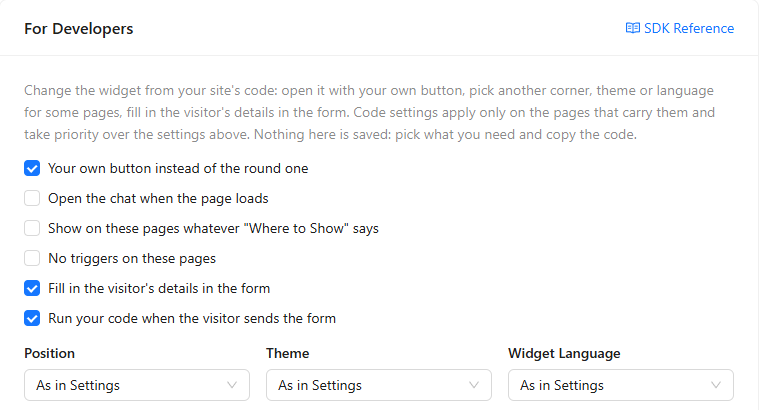
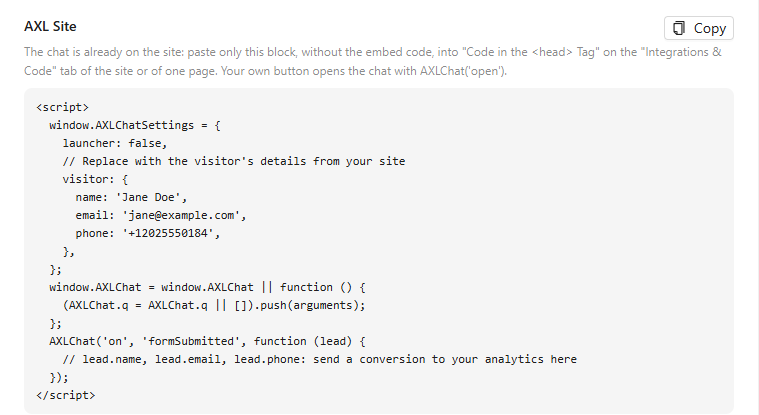
The card saves nothing and does not show Save Changes: your choices only build the code. The visitor's details in the code are samples; replace them with the values your site knows.
Settings on an AXL Site
On sites built in AXL, the platform adds the chat itself when it is turned on for the site. Do not paste the embed code there, or the chat loads twice. Paste only the <script> block with the settings:
- Open the site in Sites and go to the Integrations & Code tab. To change the chat on one page only, open that page and its own Integrations & Code tab.
- Paste the block into Code in the <head> Tag and click Save.
The platform adds the chat after this code, so the settings are already there when the chat starts.
Settings
Set window.AXLChatSettings before the embed code: the chat reads it once, when it starts. To change settings later, for example when the visitor switches your site to dark mode, call AXLChat('configure', { ... }) with only the keys to change; the others stay as they are. A key set to null goes back to the channel's own setting.
window.AXLChatSettings = {
  position: 'left',
  theme: 'system',
  lang: 'en',
  colors: { button: '#0f766e', header: '#0f766e' },
  greeting: 'Hi! Ask us about plans and pricing.',
};

// later, on the same page
AXLChat('configure', { theme: 'dark' });
AXLChat('configure', { theme: null }); // back to the channel's theme| Setting | Values | What it does |
|---|---|---|
launcher | true, false | false hides the round button. Open the chat with the open command. |
openOnLoad | true | Opens the chat when the page loads. Read only when the chat starts, so set it in AXLChatSettings. |
position | 'left', 'right' | Bottom corner of the chat. |
offsetX, offsetY | Number of pixels, 0 to 1000 | Distance from the side and from the bottom edge of the window. On phones the chat keeps its own 16 px. |
width | Number of pixels, 320 to 640 | Width of the open chat on a computer. On phones the chat takes the whole screen. |
zIndex | Number | Stacking order on the page, if elements of your site must be above the chat. Default: 2147483000. |
theme | 'light', 'dark', 'system' | 'system' follows the visitor's device. |
lang | 'en', 'ru', 'uk', 'es', 'id', 'lt', 'pt', 'zhcn', 'zhtw'; tags such as 'en-US' or 'zh-TW' work too | Language of the chat. Texts you left at their defaults in the channel settings switch to this language; texts you wrote yourself stay as written. You can pass document.documentElement.lang. |
colors | Object with any of button, header, guestBubble, guestText, operatorBubble, operatorText | CSS colors of the button, the header, the visitor's messages and your team's messages. Only the colors you list change. |
logo | Image URL starting with https:// | Picture on the round button instead of the chat icon. |
title, subtitleOnline, subtitleOffline, greeting, cardText, composerPlaceholder | Text | Header title, subtitles during and outside working hours, greeting, hint in the home screen's message field, hint in the conversation's message field. An empty text keeps the channel's own. |
skipHome | true, false | true opens the conversation right away, without the home screen. |
emoji | true, false | Emoji button in the message field. |
voice | false | Hides the microphone. A page can only turn voice messages off: when they are off in the channel settings, the chat does not accept them. |
rules | false | Shows the chat on this page whatever Where to Show says: the page rules, Mobile only and Hide on mobile are not applied. |
triggers | false | The channel's triggers do not run on this page. Set at runtime, it also removes a hint that is already shown. |
visitor | Object: name, email, phone and contact field keys | Fills in the lead form, see "Fill In the Visitor's Details". |
data | Object | Data for your team, the same as setData. |
contact | Object: contact field keys | Writes contact fields without the form, the same as setContact; see "Write Contact Fields Without the Form". |
identity | Signed token (text) | Signs in a visitor your site's server vouched for; see "Sign In Visitors with a Signed Token". |
A wrong value or an unknown key does not break the page or the chat: the chat ignores it and writes a warning starting with [AXLChat] to the browser console. Check the console when a setting seems to have no effect.
Commands
Every command is a call of the global function with the command's name first: AXLChat('open'). Once the chat script has loaded, each command is also a method with the same name: AXLChat.open(). Before that only the function form works, and only with the stub from the quick start: the calls wait in a queue and run in order when the chat is ready, and what they return is lost.
AXLChat('open'): void
AXLChat('close'): void
AXLChat('toggle'): void
AXLChat('hide'): void
AXLChat('show'): void
AXLChat('trigger', name: string): boolean
AXLChat('showHint', text: string): void
AXLChat('configure', settings: object): void
AXLChat('setVisitor', visitor: object): void
AXLChat('setContact', fields: object): void
AXLChat('identify', token: string | null): void
AXLChat('setData', data: object): void
AXLChat('setText', text: string): void
AXLChat('pageView'): void
AXLChat('on', event: string, handler: function): function
AXLChat('off', event: string, handler: function): void
AXLChat('isOpen'): boolean
AXLChat('unread'): number
AXLChat.channel(channelId: string): object | null
A command never throws. An unknown command, a wrong parameter or a wrong value is skipped, and the browser console gets a warning that starts with [AXLChat].
open, close, toggle
AXLChat('open'): void
AXLChat('close'): void
AXLChat('toggle'): void
Opens, closes or switches the chat window. No parameters.
Returns: nothing.
document.querySelector('#chat-button').addEventListener('click', function () {
  AXLChat('open');
});hide, show
AXLChat('hide'): void
AXLChat('show'): void
Hides the whole chat, button and window, until show. No parameters. The conversation stays, and replies keep arriving while the chat is hidden.
Returns: nothing.
// on the payment step
AXLChat('hide');
// after the payment
AXLChat('show');
trigger
AXLChat('trigger', name: string): booleanRuns one of the channel's triggers now, as if its conditions had just been met.
| Parameter | Type | Required | Description |
|---|---|---|---|
name | string | Yes | The trigger's name in the channel's Triggers card. The case does not matter. |
Returns: true when the trigger ran. false when the channel has no turned-on trigger with this name, its working-hours condition does not hold now, or the chat window is open (a hint is not shown over an open chat). Called before the chat has started, it returns false and runs once the chat is ready.
- The trigger's delay and page conditions are skipped: your code decides when.
triggers: falseon the page does not stop it. - A trigger that shows a phrase puts it in the hint beside the button; a trigger that hides the chat hides it.
// the visitor has spent 30 seconds on the pricing table
setTimeout(function () {
  AXLChat('trigger', 'Pricing help');
}, 30000);
showHint
AXLChat('showHint', text: string): voidShows your own text in the hint beside the chat button, the way a trigger shows its phrase.
| Parameter | Type | Required | Description |
|---|---|---|---|
text | string | Yes | The hint text, up to 500 characters. Longer text is cut. |
Returns: nothing. While the chat window is open, the hint is not shown. A click on the hint opens the chat with the text as the first message from your side, as with a trigger phrase. triggers: false does not stop it.
AXLChat('showHint', 'Questions about delivery? We are online');configure
AXLChat('configure', settings: object): voidChanges this page's settings while it is open.
| Parameter | Type | Required | Description |
|---|---|---|---|
settings | object | Yes | Any keys from "Settings". Only the keys you pass change. A key set to null goes back to the channel's own setting. |
Returns: nothing. openOnLoad is read only when the chat starts, so it has no effect here.
// your site switched to dark mode
AXLChat('configure', { theme: 'dark' });
// back to the channel's theme
AXLChat('configure', { theme: null });
setVisitor
AXLChat('setVisitor', visitor: object): voidFills in the lead form with what your site knows about the visitor. The visitor still sends the form.
| Parameter | Type | Required | Description |
|---|---|---|---|
visitor.name | string | No | The built-in Name field. firstName works too. |
visitor.email | string | No | The built-in Email field. |
visitor.phone | string | No | The built-in Phone field, in international format: +12025550184. |
visitor[key] | string, number, boolean, Date, array | No | A form field bound to a contact field, by that field's key: a system field name, a custom field's ID or its key. Keys and formats: "Fill In the Visitor's Details". |
Returns: nothing. Merged with earlier calls. A field the visitor has already typed in is not overwritten.
// the visitor signed in on your site
AXLChat('setVisitor', {
  name: 'Olivia Bennett',
  email: 'olivia.bennett@example.com',
  city: 'Austin',
});
setContact
AXLChat('setContact', fields: object): voidWrites contact fields to the visitor's contact card, without the form.
| Parameter | Type | Required | Description |
|---|---|---|---|
fields[key] | string, number, boolean, Date, array | Yes, at least one | A contact field allowed in Fields the Site May Fill, by its system name, custom field ID or key. An empty string takes back a value passed earlier. |
Returns: nothing. The values are written once the contact exists, and only into fields that are still empty. Keys that are not allowed are skipped. Details: "Write Contact Fields Without the Form".
AXLChat('setContact', { plan_level: 'Pro', newsletter: true });identify
AXLChat('identify', token: string | null): voidSigns in a visitor your site's server vouched for.
| Parameter | Type | Required | Description |
|---|---|---|---|
token | string or null | Yes | A JWT your server signed with HS256 and the chat's key; see "Sign In Visitors with a Signed Token". null forgets the token. |
Returns: nothing. The chat starts its session again with the token: the visitor gets their earlier conversation in this chat, and the form is not asked. A refused token leaves the visitor anonymous, and the console says why. null does not close a conversation already open in this browser.
// /api/chat-token is your own endpoint that returns a fresh token
fetch('/api/chat-token')
  .then(function (response) { return response.text(); })
  .then(function (token) { AXLChat('identify', token); });
setData
AXLChat('setData', data: object): voidPasses data your team sees in the conversation, in the From the Website block: a plan, an order number, an account ID.
| Parameter | Type | Required | Description |
|---|---|---|---|
data[key] | string, number | Yes, at least one | Up to 20 keys, a key up to 50 characters, a value up to 500. An empty value removes the key. |
Returns: nothing. Merged with earlier calls. Sent with the form and with each message, not when the page opens. The data stays in the conversation and does not reach the contact card; for the card, use setContact.
AXLChat('setData', { plan: 'Pro', accountId: 'A-1042' });setText
AXLChat('setText', text: string): voidPuts text into the message field.
| Parameter | Type | Required | Description |
|---|---|---|---|
text | string | Yes | The text for the message field. It replaces what is there. |
Returns: nothing. The visitor sends the message; nothing is sent by itself. Call open as well to show it.
<button type="button" onclick="AXLChat('setText', 'I have a question about the Pro plan'); AXLChat('open');">Ask about Pro</button>pageView
AXLChat('pageView'): voidFor single-page apps: tells the chat that the address changed, so it checks Where to Show and the triggers' page conditions now. Without it, the chat notices within a second. No parameters.
Returns: nothing.
// Vue Router; any router works the same way
router.afterEach(function () {
  AXLChat('pageView');
});on, off
AXLChat('on', event: string, handler: function): function
AXLChat('off', event: string, handler: function): void
Subscribes your function to a chat event, or unsubscribes it.
| Parameter | Type | Required | Description |
|---|---|---|---|
event | string | Yes | An event name from "Events". |
handler | function | Yes | Called with the event's payload. For off, the same function you passed to on. |
Returns: on returns a function that unsubscribes, once the chat has loaded; called through the stub before that, nothing. off returns nothing.
function onReply(message) {
  console.log('Reply from', message.author, ':', message.text);
}
AXLChat('on', 'message', onReply);
// later
AXLChat('off', 'message', onReply);isOpen, unread
AXLChat('isOpen'): boolean
AXLChat('unread'): number
Whether the chat window is open; how many replies the visitor has not read. No parameters.
Returns: a boolean and a number, only after the chat has loaded. Before that, nothing.
AXLChat('on', 'ready', function () {
  console.log('Unread replies:', AXLChat('unread'));
});
channel
AXLChat.channel(channelId: string): object | nullReaches one chat when the page has two of them. Plain AXLChat(...) goes to the first chat on the page.
| Parameter | Type | Required | Description |
|---|---|---|---|
channelId | string | Yes | The chat's ID, the data-channel value of its embed code. |
Returns: an object with the same commands as methods, or null while that chat has not loaded yet.
AXLChat('on', 'ready', function () {
  AXLChat.channel('SECOND_CHANNEL_ID').open();
});
Events
Subscribe with on; your function gets the event's payload.
| Event | Payload type | When |
|---|---|---|
ready | None | The chat started with the channel's settings. |
open, close | None | The visitor or your code opened or closed the chat window. |
unread | number | The number of unread replies changed. The payload is the new number. |
message | object, see below | A reply from your team or your AI agent arrived. |
messageSent | object, see below | The visitor sent a message. |
formSubmitted | object, see below | AXL accepted the visitor's lead form. |
message payload
| Field | Type | Description |
|---|---|---|
id | string | The reply's ID. |
text | string | The reply's text; empty for a reply with files only. |
author | string or null | The sender's name, or null when the reply has no named sender. |
createdDate | string | When the reply was sent, ISO 8601 date and time in UTC. |
messageSent payload
| Field | Type | Description |
|---|---|---|
text | string | The message text; empty for a voice message. |
files | number | How many files the visitor attached. |
voice | boolean | Whether it is a voice message. |
formSubmitted payload
| Field | Type | Description |
|---|---|---|
name | string | The built-in Name field. |
email | string | The built-in Email field. |
phone | string | The built-in Phone field. |
Only the fields the visitor filled in are present. Other form fields go to the contact card and are not passed to the page.
Replies reach the page only while the chat is connected, that is once the visitor has a conversation or has opened the chat. A visitor who never writes gets no message events.
Fill In the Visitor's Details
If the visitor is signed in on your site, pass what you know about them so they don't type it again. visitor fills in the fields of the lead form, the built-in ones and those bound to contact fields; when the visitor sends the form, the answers go to their contact card, as with answers they type themselves:
window.AXLChatSettings = {
  visitor: {
    name: 'Olivia Bennett',
    email: 'olivia.bennett@example.com',
    phone: '+12025550184',
    city: 'Austin',
    birthday: '1990-05-17',
  },
  data: { plan: 'Pro', accountId: 'A-1042' },
};

// or later, for example after the visitor signs in
AXLChat('setVisitor', { name: 'Olivia Bennett', email: 'olivia.bennett@example.com' });
A key is the contact field the form field is bound to:
| Key | Form field |
|---|---|
name (or firstName), email, phone | The built-in Name, Email and Phone fields. |
lastName, middleName, city, country, birthday, comment | A field you added to the form from these contact fields. |
| The ID of a custom contact field, or its key | A field you added to the form from your custom contact fields. The key is the one set for the field in the CRM's custom fields; the chat learns a new or changed key when the channel settings are saved. |
You don't need to look up the keys: check Fill in the visitor's details in the form in the For Developers card, and the code lists every field of your form with its key, a sample value for the built-in fields and the field's name beside the others.
Pass each value in the field's own format:
| Field type | Value |
|---|---|
| Text, number | Text or a number: 'Austin', 42 |
| Date | 'YYYY-MM-DD': '1990-05-17'; a full ISO date also works |
| Date and time | 'YYYY-MM-DDTHH:mm': '2026-11-03T15:30', or a JavaScript Date |
| Yes/no | true or false |
| List | The option's text as the visitor sees it (any case) or its ID |
| List with several options | An array of option texts or IDs: ['Beginner', 'Weekends'] |
- A key with no matching field on the form fills nothing, and a value that does not fit the field (a date in another format, an option the list doesn't have) is skipped. To pass such data to your team, use
setData: they see it in the conversation, but it does not go to the contact card. - The phone fills its field only if Phone is turned on in the channel's Lead Form settings.
- The visitor sees the form filled in and still sends it. Nothing reaches AXL until they do, and the values are checked only then.
- A field the visitor has already typed in is not overwritten.
- This does not open an earlier conversation of that person. The chat continues a conversation only in the same browser, or for a contact the page already knows, as described in "Website Chat".
Write Contact Fields Without the Form
setContact writes what your site knows straight to the visitor's contact card, without showing it in the form: a plan, a city, a customer level. Because anyone can change a page's code in their browser, this works only for fields you allow, and it never overwrites what the contact already has:
- Open the chat's Settings tab and expand Additional Settings at the end of the form.
- In Fields the Site May Fill, choose the contact fields your code may write: system fields (name, city, country, birthday, gender, comment) or your custom fields. Email and phone are not on the list: they decide who the contact is.
- Click Save Changes.
window.AXLChatSettings = {
  contact: { city: 'Austin', plan_level: 'Pro' },
};

// or at any moment later
AXLChat('setContact', { plan_level: 'Pro', newsletter: true });- Keys and value formats are the same as for
visitor: a system field name, a custom field's ID or its key; dates as'YYYY-MM-DD', yes/no astrueorfalse, list options by text or ID, several options as an array. - The values go to AXL with the visitor's form and messages and are written once the contact exists, that is after the form or the first message.
- Only empty fields are filled. A field the contact already has a value in, from the CRM, an import or an earlier form, stays as it is. To update such values, use a signed token.
- Keys that are not allowed, and values that do not fit the field, are skipped without an error.
Sign In Visitors with a Signed Token
When the visitor is signed in on your site, your site's server can vouch for them. The chat then knows who they are without the form: it opens their earlier conversation on any device, and the contact fields from the token update their contact card. The proof is a short-lived token that your server signs with the chat's key; the page only passes it on.
- Open the chat's Settings tab and expand Additional Settings. Key for Signed Visitors shows the chat's key: it is created automatically. Click the copy button and store the key on your server, for example in an environment variable. Never put it in page code.
- On your server, for each signed-in visitor, make a JWT signed with HS256 and this key. It must carry
exp, no later than 24 hours ahead, and the visitor'semailorphone. - Put the token on the page:
window.AXLChatSettings = { identity: '...' }before the embed code, orAXLChat('identify', '...')after the visitor signs in.
| Claim | Required | What it is |
|---|---|---|
exp | Yes | Expiry time in Unix seconds, at most 24 hours ahead. Make a new token for each page load or for each session on your site. |
email | This or phone | Who the visitor is. AXL looks for the contact by email first, then by phone. |
phone | This or email | Phone in international format, +12025550184. |
name | No | Name for a contact AXL does not have yet. |
fields | No | Contact fields by key, in the formats described above. They are written over the contact's current values. |
Node.js (the jsonwebtoken package):
const jwt = require('jsonwebtoken');

const identity = jwt.sign(
  { email: user.email, name: user.name, fields: { plan_level: user.plan } },
  process.env.AXL_CHAT_KEY,
  { algorithm: 'HS256', expiresIn: '1h' }
);
PHP (the firebase/php-jwt package):
use Firebase\JWT\JWT;

$identity = JWT::encode([
    'email' => $user->email,
    'name' => $user->name,
    'exp' => time() + 3600,
], getenv('AXL_CHAT_KEY'), 'HS256');
Python (the PyJWT package):
import os, time, jwt

identity = jwt.encode(
    {"email": user.email, "name": user.name, "exp": int(time.time()) + 3600},
    os.environ["AXL_CHAT_KEY"],
    algorithm="HS256",
)
Then on the page:
<script>
  window.AXLChatSettings = { identity: '<?= $identity ?>' };
</script>
<script src="https://static.axl.tech/site-chat/site-chat.js" data-channel="YOUR_CHANNEL_ID" async></script>- A known contact gets their earlier conversation in this chat, also on another device, and the form is not asked. If the browser held another person's conversation (a shared computer), the visitor starts their own instead.
- An email or phone AXL does not have yet counts as a filled-in form: the contact is created with the visitor's first message.
- A refused token leaves the visitor anonymous, and the browser console says why:
[AXLChat] identity token refused: expired. Reasons:signature(another key),algorithm(not HS256),no_expiry,expired,too_long_lived(more than 24 hours),no_identity(no email or phone),malformed. - Keep tokens short-lived. Until it expires, whoever has a token can open that person's conversation in this chat. If the key leaks, click New Key in Additional Settings: tokens signed with the old key stop working at once, so update the key on your server right away.
Examples
Show the number of unread replies on your own button:
AXLChat('on', 'unread', function (count) {
  document.querySelector('#chat-badge').textContent = count > 0 ? count : '';
});
Send conversions to Google Analytics:
AXLChat('on', 'formSubmitted', function (lead) {
  gtag('event', 'generate_lead', { method: 'website_chat' });
});
AXLChat('on', 'messageSent', function (message) {
  gtag('event', 'chat_message_sent');
});
Open the chat for a signed-in visitor with their details already in the form, from your own button:
window.AXLChatSettings = {
  launcher: false,
  visitor: { name: user.name, email: user.email },
};

document.querySelector('#help-button').addEventListener('click', function () {
  AXLChat('open');
});
What to Know
- The page cannot loosen what AXL checks. Whether the lead form is required, message and file limits, working hours, the team and Allowed Sites stay as set in the channel; AXL checks them for every visitor.
rules: falsedoes not let the chat start on a site outside the allowed list. Only a signed token skips the form, because your server vouched for the visitor. - A visitor in a conversation keeps the chat. When Where to Show would hide the chat on a page, a visitor who already wrote still sees it, so they don't miss the reply. Only
AXLChat('hide')hides it for them. openOnLoadopens the chat on every load of the pages with it, even if the visitor closed it on the previous page.- Settings are not remembered. They live only while the page is open; put them on every page that needs them.
- The membership area chat is part of AXL and does not read these settings.