A broadcast sends one email to many contacts at once: a newsletter, an announcement or an offer.
Create a Broadcast
Open Email → Broadcasts and click Create Broadcast. The list also shows how your earlier broadcasts went: how many emails were sent, opened and clicked.
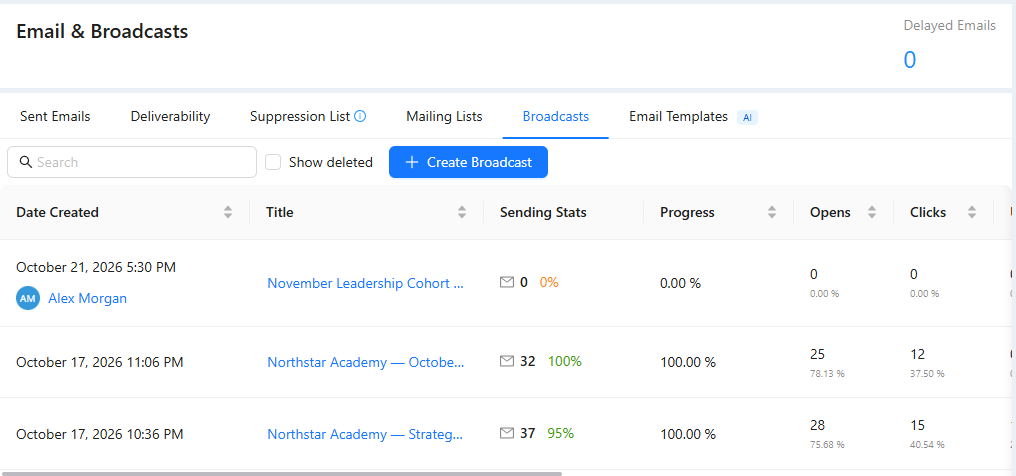
Choose the Audience and the Time
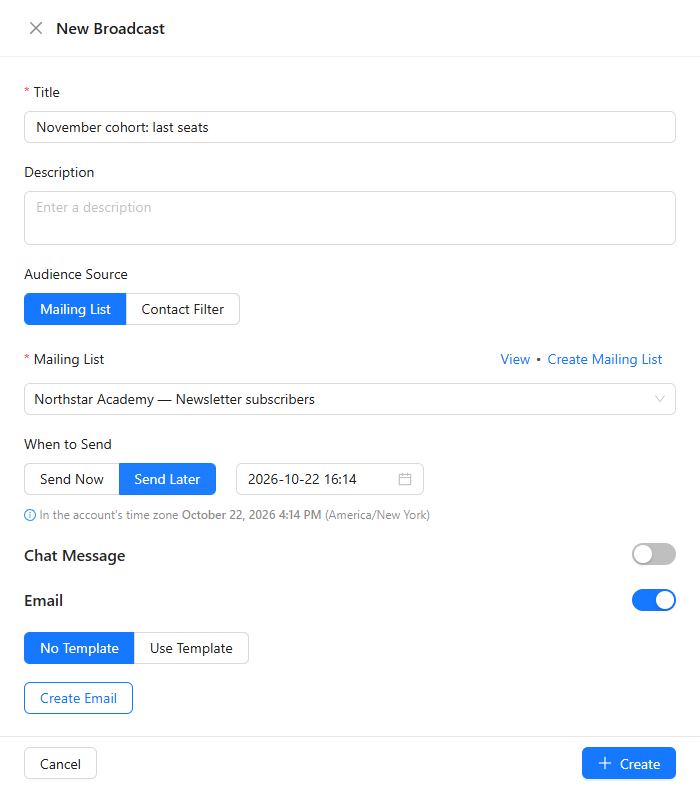
- Enter a Title for the broadcast.
- Under Audience Source, choose a Mailing List or build a Contact Filter, for example everyone with a certain tag.
- Under When to Send, choose Send Now or Send Later and set the date and time in the account's time zone.
- With Email on, click Use Template to pick a saved email, or Create Email to write a new one, with AI or from a ready-made design.
Test and Send
- In the email editor, use Send Test Email with an address you control and check the email there.
- Click Create. With Send Now the broadcast starts sending; with Send Later it waits for the time you set.
Contacts without an email, unsubscribed contacts and banned contacts are skipped automatically. More in "Broadcasts" and "Mailing Lists".