A phone number is what your customers call and what your calls and texts come from. You can connect as many numbers as you need, for example one per department or per country, and give each its own team and its own way of handling incoming calls. Numbers are on the Numbers tab of Communications → Telephony.
Connect a Number
- On the Numbers tab, click Add Number.
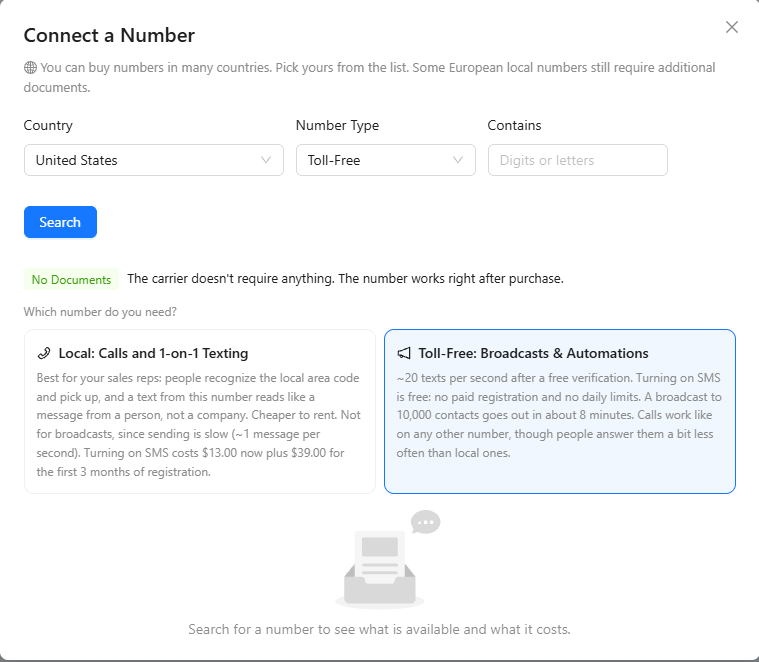
- Choose the Country and the Number Type. Optionally, enter digits or letters the number should contain. Click Search.
- The window says whether the carrier needs documents for this country and type. With No Documents, the number works right after purchase.
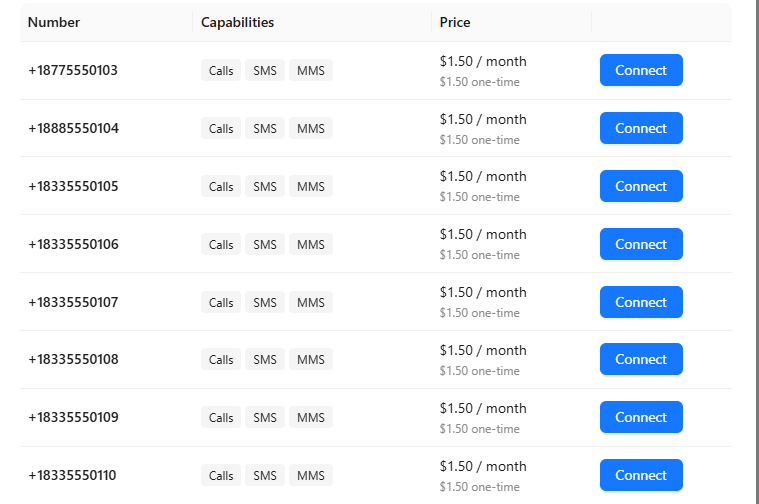
- The results show what each number supports (calls, SMS, MMS) and its monthly and one-time price. Click Connect next to the number you want.
Where the carrier needs documents, AXL asks for them after you pick the number, and the number shows Under review by the carrier until it is approved. Its rent starts once the number is activated.
Local or Toll-Free
The available types depend on the country. In the US and Canada:
- Local: best for sales and one-to-one texting. People recognize the area code and answer more often, and a text from a local number reads like a message from a person. It costs less to rent, but texting is slow, about one message per second, so it doesn't suit broadcasts. Turning on SMS for a local number needs a paid registration. See "SMS and SMS Registration".
- Toll-Free: best for broadcasts and automations. After a free verification it sends about 20 texts per second with no daily limit, so a broadcast to 10,000 contacts goes out in about eight minutes. Calls work like on any other number, though people answer them a little less often.
The Number Card
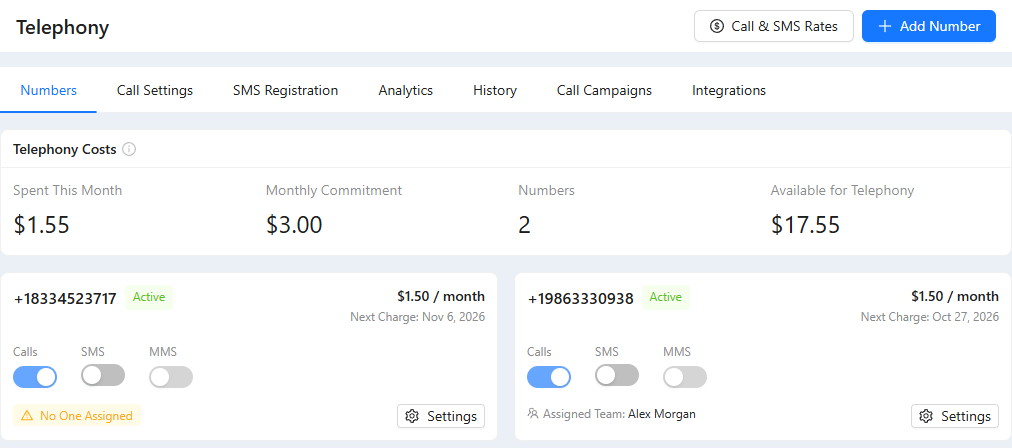
Each number on the Numbers tab has a card with its status, the monthly price and the date of the next charge, and switches for Calls, SMS and MMS. Turning SMS on starts the SMS registration. Below the switches, the card shows who works the number. No One Assigned means no team member can take its calls yet. Settings opens everything else.
Number Settings
Click Settings on the number card:
- Name: an optional name to tell your numbers apart.
- Call Recording & Analysis: Record and transcribe calls, and create an AI summary is on by default. The transcript and summary appear on the call card. Transcription and analysis are billed as AI usage.
- Who Hears the Recording Notice: Everyone (Recommended) or Never. Check what the law requires where you and your customers are.
- Incoming Calls: ring the team, forward to a phone number, or let an AI agent answer. See "Incoming Calls".
- Outgoing Calls: All Countries, Only the selected countries or All countries except the selected. A number can only narrow the account-wide list in "Call Settings".
- Use for outgoing calls when it is cheaper: makes this a substitute number. See below.
- Who Uses This Number: the team members who work the number. Calls lets them take and make calls on it, SMS gives them its shared text inbox, and Default makes it the number their calls go out from. Each person has only one default number. Add Team Member adds a colleague; the trash can removes one.
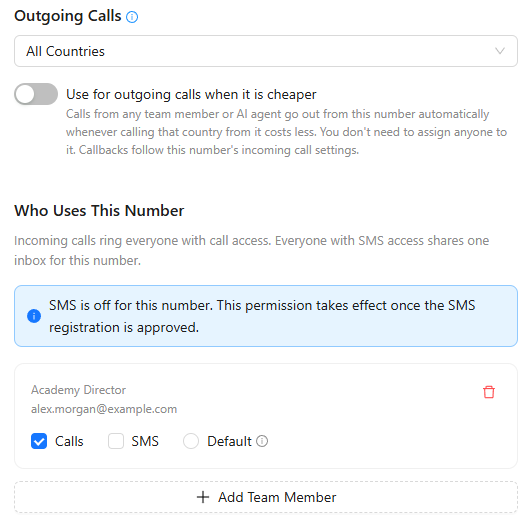
Click Save to apply the changes. Release at the bottom gives the number up; you are asked to confirm.
Substitute Numbers
The price of a call depends on the country of the number it is made from, and the difference can be several times. A substitute number lets AXL pick the cheaper number for each call by itself.
- Connect a number in the country you call often.
- Open its Settings, turn on Use for outgoing calls when it is cheaper and click Save. The card shows Substitute number.
From then on, calls by any team member and by AI agents go out from this number whenever it is cheaper for the destination. Nobody needs to be assigned to it.
Important:
- AXL switches only when it saves at least 20% and at least half a cent per minute, so customers don't see an unfamiliar number for a tiny saving.
- The substitute must support calls, and its allowed countries must include the destination.
- When a customer calls the substitute number back, the call rings the team member who last called them from it. Other calls to it follow the number's own incoming-call settings.
The Calls can be cheaper card on the Numbers tab estimates the saving from your recent calls and suggests a number to turn on or buy.
Call and SMS Rates
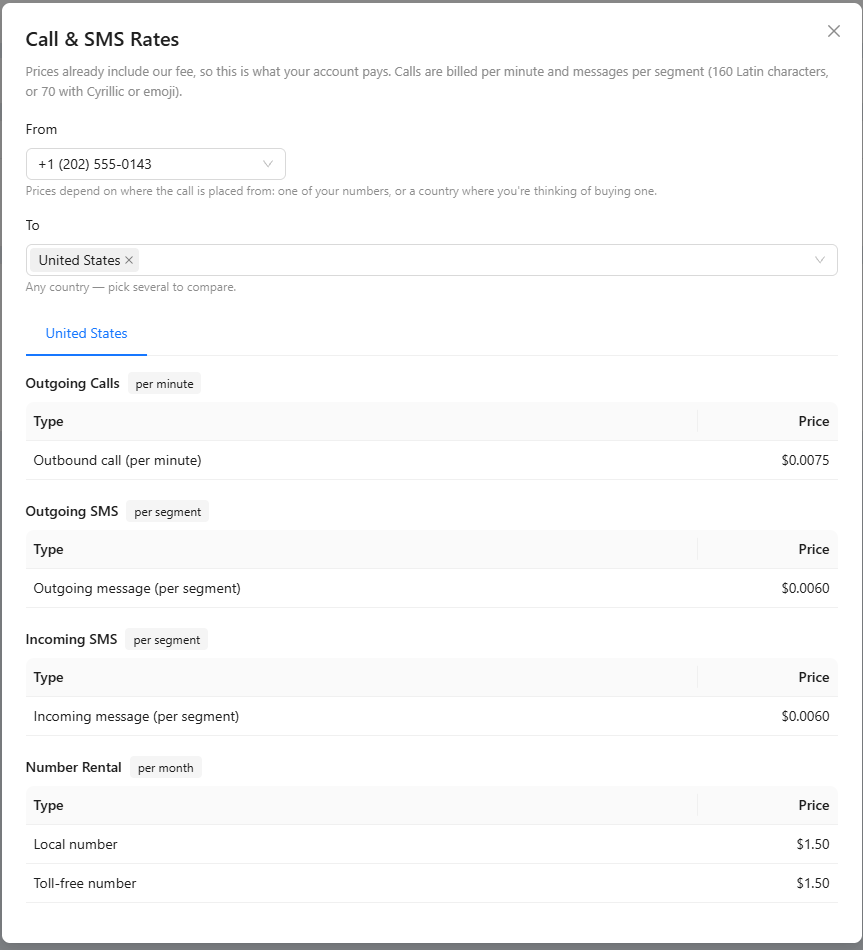
Click Call & SMS Rates at the top of the Telephony page. In From, choose one of your numbers or a country where you are thinking of buying one; in To, pick one or several countries to compare.
- The prices already include the AXL fee: this is exactly what your account pays.
- Calls are billed per minute. Texts are billed per segment: 160 Latin characters, or 70 with Cyrillic or emoji.
- Transcription and AI summaries are billed separately, as AI usage.