Responsibles are the administrators of your account, who are assigned to each client and are responsible for him. For example, they perform tasks, add accesses, make changes to the personal data of a contact, etc. You can add several responsible administrators and distribute functions between them. Read more in the "Team" article.
In the Responsibles tab, you see the assigned Responsible Administrator for this contact. If the admin is not selected, click the "Add" button and select from the list of administrators for your account.
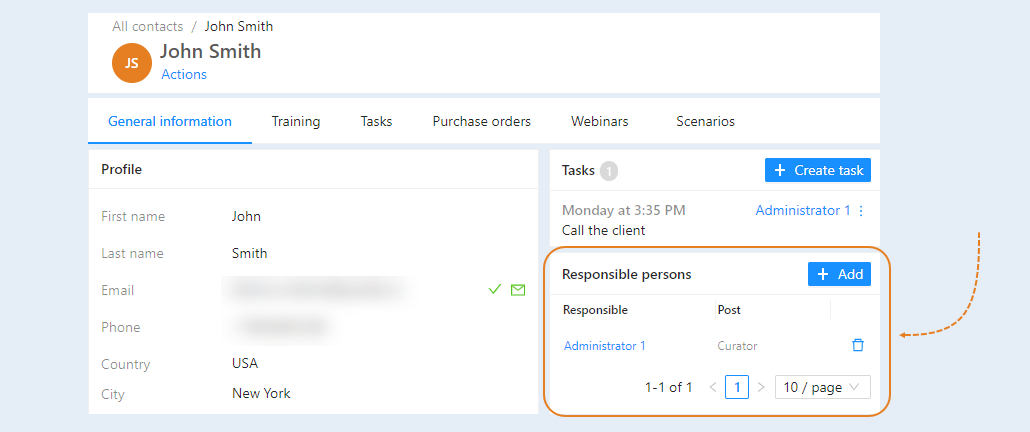
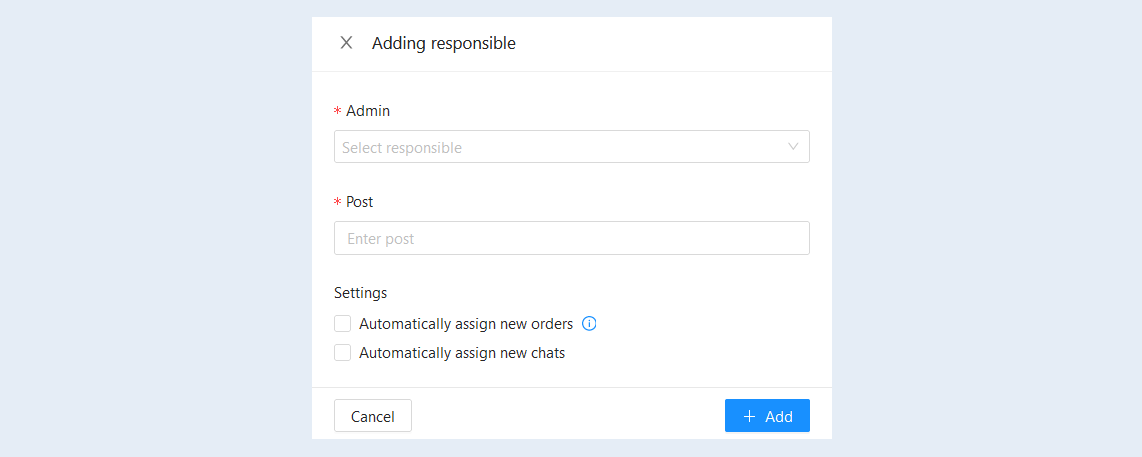
You will see an additional window "Add responsible". Fill in the fields:
Admin. Select from the list of administrators the responsible admin for this contact.
- Post. Indicate the position of this admin.
- Automatically assign new orders. Check this box to assign all subsequent orders from this contact to the responsible employee. Tracking of new orders is only available to one responsible person.
Automatically assign new chats. Check the box to assign all new chats from this contact to the responsible employee.
Click the "Add" button. The name and position of the administrator will appear in the "Responsible" tab. On the right is the "Delete" button. Click it if you want to remove an admin and assign another one.Far far away, behind the word mountains, far from the countries Vokalia and Consonantia, there live the blind texts.