Every number decides for itself what happens when someone calls it. Calls can ring your team in the browser, go to a cell phone or landline, or be answered by an AI voice agent, for example at night or when everyone is busy. Open Communications → Telephony, click Settings on the number card and choose one option under Incoming Calls.
Ring the Team
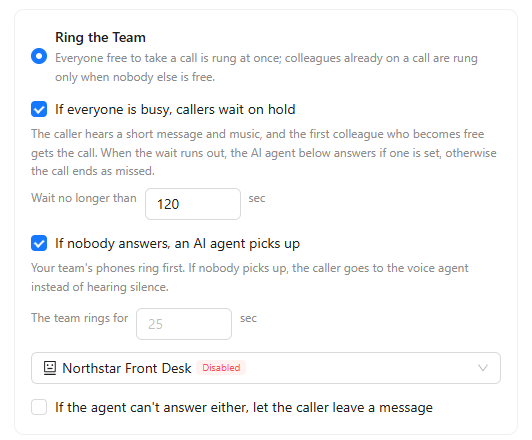
The call rings everyone who has Calls permission on this number. Everyone free to take a call is rung at once; colleagues already on a call are rung only when nobody else is free. Two options make sure the caller is not left hanging:
- If everyone is busy, callers wait on hold: the caller hears a short message and music, and the first colleague who becomes free gets the call. Set Wait no longer than in seconds. When the wait runs out, the AI agent answers if one is set; otherwise the call ends as missed.
- If nobody answers, an AI agent picks up: your team's phones ring first for the time set in The team rings for, and then the caller goes to the voice agent you choose instead of hearing silence. Tick If the agent can't answer either, let the caller leave a message to take a voicemail in that case.
Forward to a Phone Number
Calls go to the cell phone or landline you enter in Forward to. Your team can still make outgoing calls from the number and share its texts.
AI Agent Answers
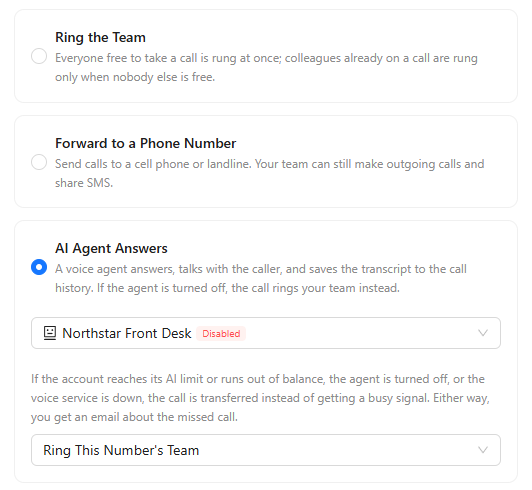
A voice agent answers every call, talks with the caller and saves the transcript to the call history. Choose the agent in the list; agents are created in Settings → AI Agents. See "AI Voice Agents".
Under If the Agent Can't Answer, choose what happens when the agent can't take a call: the account reached its AI limit or ran out of balance, the agent is switched off, or the voice service is down. The call is then transferred instead of getting a busy signal:
- Ring This Number's Team.
- Ring chosen colleagues: pick them in the list.
- Nobody — the caller hears busy.
Either way, you get an email about the missed call.
Click Save in the number settings to apply the choice.
Where Calls Show Up
Team members hear incoming calls in the phone window in the browser. See "Calls in the Browser". Every call, including calls the AI agent handled, is listed on the History tab with its recording, transcript and summary. See "Call Analytics".